Word Cross: Crossy Word Search
MASTERMIND WORD GAMESWord
4.8770.00 Reviews
- Version
- 2.2.1
- Installs
- 100.00K
- Age Rating
- Everyone
Screenshots

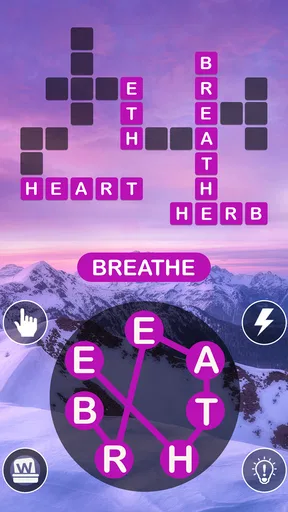


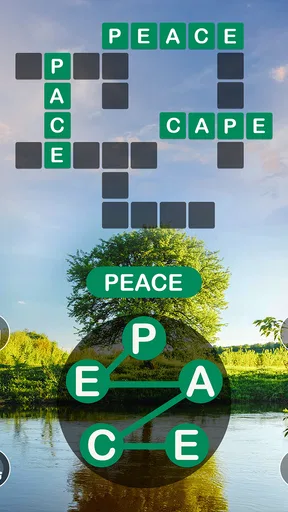
Our Review of Word Cross: Crossy Word Search
 Analysis by Appyee
I spent time with Word Cross: Crossy Word Search as a casual word game, paying particular attention to how comfortably it works in different everyday situations. It is built around crossword-style word finding, so the basic appeal is easy to understand: you look for words, exercise your vocabulary, and take a quiet mental break. The presentation is more relaxed than competitive, which makes it a natural fit for short sessions rather than a game that demands your full attention for a long stretch.
What stood out to me was how approachable the central idea feels. I can open it when I have a few spare minutes, solve a small section, and stop without feeling that I have abandoned a complicated task. At the same time, it is not completely effortless. Some puzzles ask me to slow down, rearrange possible answers in my head, and notice words I would normally overlook. That balance gives it more staying power than a simple anagram toy, although players looking for a highly strategic or story-driven experience may find it modest.
How Word Cross feels to use in real situations
I find Word Cross easiest to appreciate when I treat each visit as a small, self-contained pause rather than a task I need to finish in one sitting. That makes the crossword-style format useful in ordinary pockets of spare time, while also revealing when visual focus or language effort makes a session less relaxing. The next section looks at how that balance plays out in practice.
Readability and navigation during a puzzle
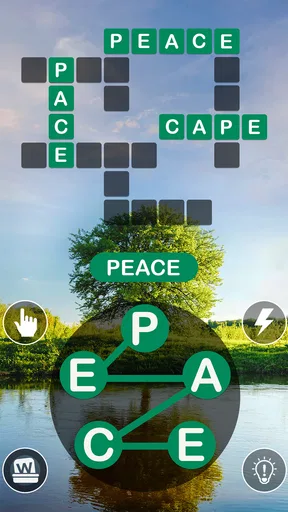
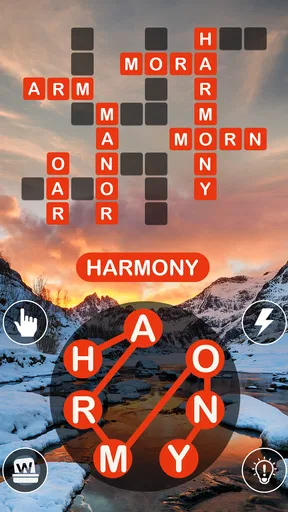
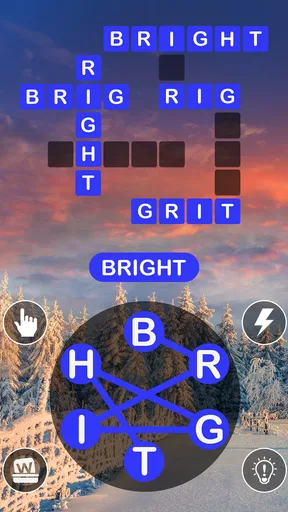
The game’s word-puzzle format keeps the main activity understandable. I am not dealing with a large collection of unrelated menus before I can begin; the purpose of a session is clear from the moment I start looking for answers. That simplicity matters for people who prefer predictable navigation or who do not want to learn a complicated interface before relaxing.
I also found the crossword structure useful for orientation. The board gives me a visible sense of progress because completed spaces remain part of the puzzle rather than disappearing into a separate screen. When I return after a pause, I can usually recognize where I left off by looking at the unfinished pattern. This is a small but meaningful advantage over word games that rely heavily on remembering a long list of discovered answers.
The layout is best suited to someone who can comfortably distinguish letters and follow the relationship between the word bank and the puzzle area. If I am tired, distracted, or playing in poor lighting, I need to concentrate more carefully on individual characters. That is not unusual for this type of game, but it does mean the experience depends on visual clarity rather than on audio or purely tactile feedback.
For a new player, I would recommend starting with a relaxed pace instead of trying to solve every word immediately. The game becomes easier to read when I treat the board as a collection of small patterns rather than one large challenge. I look first for familiar short words, then use the remaining spaces to test less obvious combinations. This approach reduces the feeling of staring at a wall of letters and makes the navigation feel more manageable.
The developer, MASTERMIND WORD GAMES, has kept the concept focused enough that I do not need extensive instructions to understand what I am doing. That is helpful for children, older players, and anyone who prefers learning by trying. The content rating is Everyone, which matches the gentle, general-purpose nature of the activity. Still, an age rating does not automatically mean that every player will find the text equally comfortable to read, so personal eyesight and device settings remain important.
Motor and sensory considerations
From a movement perspective, this is a relatively calm game. It does not ask me to react to rapidly changing targets or perform precise actions under pressure. That makes it more suitable than many action-oriented alternatives for players who prefer deliberate taps and pauses. I can think through a possible answer before committing, which removes much of the stress associated with fast input.
That said, word puzzles still require repeated touch interaction. A player with limited finger control may find small letter areas or closely placed controls tiring, especially during a longer session. I would approach it in short rounds and use the device in the position that gives the most stable tapping surface. The game is a better match for controlled, individual selections than for anyone who needs hands-free play.
Sensory comfort is also personal. The quiet puzzle style can feel less overwhelming than a game filled with flashing effects, urgent timers, or constant sound cues. I appreciate that the core task does not depend on a rapid stream of visual changes. On the other hand, anyone who needs large text, strong contrast, spoken guidance, or highly adjustable display options should check the experience on their own device before committing to it as a daily tool. I would not assume that a simple game automatically provides every accessibility adjustment a player may need.
One practical habit helped me: I avoid playing while walking or while handling other tasks. The game is easy to pause mentally, but solving a word still requires attention to letters and positions. In a quiet room, I can inspect the board carefully; in a busy environment, I am more likely to misread a pattern or tap the wrong area. That makes the game suitable for calm breaks, waiting rooms, and bedtime wind-downs, but less suitable when my attention is divided.
Because the experience is based on language, sensory access is only one part of the picture. Vocabulary familiarity also affects comfort. A player who speaks English as an additional language may find some puzzles more demanding, not because the controls are difficult, but because recognizing possible words takes longer. I see that as a normal trade-off in a word game, yet it is worth remembering when choosing it for a mixed-age or mixed-language household.
Using it during short breaks and offline-style routines
The strongest everyday use case for me is the small waiting period: a coffee break, a quiet commute as a passenger, or a few minutes before sleep. I can enter a puzzle mindset without making a large commitment. Unlike a long-form adventure game, it does not require me to remember a plot, manage equipment, or recover a complicated strategy after an interruption.
I also like the way a crossword-style task can occupy my attention without demanding emotional investment. If I have had a busy day, I can focus on finding one word at a time. That makes it a reasonable choice for someone who wants mental stimulation but does not want a competitive leaderboard or a demanding challenge. The store summary presents it as a way to relax, improve skills, and exercise the brain, and in my experience the relaxing part is the most convincing of those promises.
Its usefulness for learning is more limited and more personal. I may notice spelling patterns or recall words I have not used recently, but I would not treat it as a structured language course. Someone studying vocabulary seriously would be better served by an app designed around definitions, pronunciation, spaced repetition, or personalized lessons. This game can complement that kind of practice, but it should not replace it.
Compared with a traditional newspaper crossword, the mobile format is more convenient because it is always available and does not require a pen. Compared with a basic word-search puzzle, it asks me to think more about how letters combine into answers and how the completed pattern fits together. Compared with a fast anagram game, it feels less frantic. The trade-off is that players who enjoy handwritten solving, rich clues, or a strong sense of competition may prefer those alternatives.
Where the experience still creates barriers
The biggest limitation is that the game’s accessibility depends heavily on visual interaction and language processing. I can make the experience easier by increasing device text size where the operating system allows it, cleaning the screen, and playing in good light, but those adjustments may not change the game’s own layout. A person who relies on spoken output or needs unusually large interactive targets may find the basic puzzle format restrictive.
Another barrier is mental fatigue. Word games can look gentle while still requiring sustained concentration. When I am tired, I sometimes cycle through the same guesses instead of noticing a new possibility. That is not a flaw in the puzzle itself, but it affects whether the game feels relaxing. I get better results by stopping after a natural break rather than forcing a solution simply because a level is unfinished.
The free price makes trying it easy, but in-app purchases range from $0.99 to $49.99 per item. I would keep that in mind if the game is being used on a shared device or by a child. Free installation lowers the entry barrier, yet optional spending can still matter to families managing a budget. I prefer to decide in advance whether I am comfortable with purchases rather than making that decision in the middle of a difficult puzzle.
There is also a difference between being easy to start and being universally comfortable. I can understand the game quickly, but that does not guarantee that every player will enjoy the same reading density, tapping rhythm, or vocabulary level. A friend with strong eyesight and a love of crosswords may find it immediately welcoming. Another friend who needs audio instructions or avoids text-heavy screens may be better served by a different kind of casual game.
The version I reviewed is 2.2.1 and it supports devices running Android 7.0 or later. That gives it a broad place on older Android hardware, although actual comfort will still depend on the phone or tablet’s screen and responsiveness. A larger tablet may make the board easier to inspect, while a small phone can feel more cramped for players who need generous spacing. I would test it on the device where I intend to play rather than judging the experience only from its compatibility range.
Who should choose it, and who should look elsewhere
I would recommend this game to someone who enjoys crossword-style word challenges but wants a lighter, more immediately available format. It suits players who like building answers gradually, revisiting a puzzle after interruptions, and spending a few quiet minutes with language. It is also a sensible option for families seeking an Everyone-rated game that does not revolve around combat, racing, or social pressure.
I would be more cautious about recommending it to someone searching for deep clue writing, a competitive multiplayer scene, or a formal educational program. A newspaper crossword may offer richer clues and a stronger sense of authorship. A dedicated vocabulary app may provide better explanations and progress tracking. A word-search game may be preferable for someone who wants to scan for hidden words without having to infer answers from a crossword pattern.
For players with access needs, my recommendation is conditional rather than automatic. If you are comfortable reading letters on your phone and tapping individual answers, the calm pace may work well. If you depend on screen-reader support, need extensive visual customization, or find repeated tapping difficult, I would choose an app whose accessibility tools are central to its design. The absence of frantic action is helpful, but it does not solve every access problem.
One useful routine is to treat the game as a focus reset rather than a test of intelligence. I start with a short session, solve the obvious words, and leave the stubborn section for later. This prevents the familiar trap of turning a relaxing activity into a frustrating obligation. It also makes the game more inclusive for players whose concentration varies during the day.
My inclusive verdict
Word Cross: Crossy Word Search is a friendly, focused word game that works best when I want a quiet challenge without a steep learning curve. Its crossword-based structure gives me a clear task, its relaxed pace avoids the pressure of action games, and its free entry makes experimentation straightforward. MASTERMIND WORD GAMES has aimed the experience at a broad audience, and the Everyone rating reflects that general tone.
The game is not a complete accessibility solution, and I would not present it that way. Its comfort depends on readable letters, accurate tapping, and familiarity with the language. Players who need audio-first interaction, very large controls, or formal learning support may need another option. Even for players who meet those requirements, long sessions can become tiring because the central activity remains visually and mentally concentrated.
Its reception is encouraging: it holds a 4.8 average from around 2.8 thousand ratings, alongside roughly 770 written reviews, and has passed 100 thousand installs. Those figures suggest that many people find the format appealing, but my own advice is still based on fit rather than popularity. I would try it if I wanted crossword-like relaxation in short bursts, especially on an older compatible Android device.
After using it, my honest conclusion is simple: choose it for calm, flexible word practice, not for advanced accessibility controls or a full educational system. It earns a place among casual word games because it is easy to understand and pleasant to return to. Its main weakness is equally clear: the experience asks the player to see, read, and tap comfortably. If those conditions match your needs, it can become a satisfying little break in the day; if they do not, a more deliberately accessible alternative will be the kinder choice.
Verdict
Strengths of Word Cross: Crossy Word Search
- Large word library keeps puzzles varied and replayable.
- Simple controls make it comfortable to play with one hand.
- Hints help prevent difficult boards from becoming frustrating.
- Short levels fit well into quick breaks or commutes.
- Offline play is useful when you have no internet connection.
Limitations of Word Cross: Crossy Word Search
- Some later puzzles may rely on obscure or uncommon words.
- Repeated layouts can make the experience feel predictable over time.
- Hint systems may be limited unless you watch ads or spend currency.
- Advertising can interrupt the flow between completed puzzles.
- The relaxed pace may feel too easy for experienced word-game players.
Other Releases by MASTERMIND WORD GAMES
View All
Similar Picks in This Category
View All
Word Search - Word Puzzle Game
Bluetile4.8

Word Search Quest - Puzzles
Blackout Lab4.8

CodyCross: Crossword Puzzles
Fanatee, Inc.4.7

Words of Wonders: Crossword
Fugo Games4.9

Wordscapes: Word puzzle game
PeopleFun4.7

Word Search Explorer
PlaySimple Games4.9
Frequently Asked Questions
What is Word Cross: Crossy Word Search?
Word Cross: Crossy Word Search is a casual word puzzle game that combines crossword-style challenges with word searching. You connect letters, complete words, and solve progressively more difficult boards. The game is designed for short play sessions, making it suitable for relaxing at home or playing while traveling. Its simple controls allow most players to begin without needing a detailed tutorial.
How does the gameplay work in Word Cross: Crossy Word Search?
Each level provides a group of letters that you swipe or connect to form valid words. Correct answers are placed into a crossword-like grid, while additional words may reward you with bonus points or coins. As you advance, the puzzles generally become more challenging and require a broader vocabulary. Hints are available when you get stuck, although using them may consume in-game currency.
Can Word Cross: Crossy Word Search be played offline?
Many of the core puzzles can usually be played without a constant internet connection, which makes the game convenient for commuting or areas with limited service. However, certain features may require connectivity, including advertisements, bonus rewards, cloud synchronization, updates, or promotional events. Availability can vary by version and device, so it is sensible to open the game online at least once after installation.
Is Word Cross: Crossy Word Search free to download and play?
Word Cross: Crossy Word Search is generally offered as a free download, allowing users to access the main puzzle experience without paying upfront. Like many free mobile games, it may include advertising and optional in-app purchases for coins, hints, ad removal, or other conveniences. You can normally progress without spending money, but completing difficult levels may take more time if you choose not to purchase extra assistance.
Is Word Cross: Crossy Word Search suitable for children and beginners?
The game is approachable for beginners because its controls are straightforward and the early levels introduce the word-building system gradually. It can also support vocabulary practice, although the difficulty and word selection may not be appropriate for every age group or language ability. Parents should review the store rating, advertising, and purchase settings before allowing children to play, especially on a shared device.
Play our best games!


